

The target for Subnautica 2 at 4K is High settings at 60 FPS — not Epic. Dropping Global Illumination, Shadows, View Distance, Shading, and Effects from Epic to High produces large performance gains while keeping the game looking excellent. Use DLSS Quality on Nvidia RTX cards, TSR on AMD and Intel, and cap your frame rate at 60 until your hardware can sustain higher.
Best 4K Settings for Subnautica 2
| Setting | Best 4K Value | Why |
|---|---|---|
| Resolution | 3840×2160 | Native 4K target |
| Display Mode | Fullscreen or Borderless | Use whichever gives better stability for your setup |
| FPS Cap | 60 FPS | Matches the current 4K High performance target |
| Graphics Preset | High | More stable than Epic at 4K on most hardware |
| Upscaling (Nvidia RTX) | DLSS Quality | Best image quality with meaningful FPS headroom |
| Upscaling (AMD/Intel) | TSR Quality or Balanced | Native FSR is not currently available; TSR is the fallback for non-Nvidia GPUs |
| DLSS Frame Generation | On only if base FPS is stable | Do not use to mask an unstable base frame rate |
| Global Illumination | High | One of the most expensive settings in the game |
| Shadows | High | Large FPS gain compared to Epic with minimal visual loss |
| View Distance | High | Drop first if you encounter stutters during exploration |
| Shading | High | Good balance between rendering quality and cost |
| Effects | High | Stabilises performance in heavy underwater scenes |
| Textures | High or Epic if VRAM allows | Try Epic only if you have plenty of VRAM, ideally 16 GB for 4K; lower to High if hitching occurs |
| Motion Blur | Off | Cleaner image at 4K; no meaningful quality trade-off |
| V-Sync | Off with VRR/G-Sync/FreeSync; On if tearing appears | Depends on monitor |
Best 4K Settings for Nvidia RTX GPUs
Nvidia users currently have the most complete in-game upscaling path because Subnautica 2 supports DLSS and DLSS Frame Generation, while FSR is not available yet. DLSS Quality is the recommended starting point at 4K — it renders at roughly 67% of native resolution and upscales to 4K, recovering substantial FPS while keeping the image sharp enough that the difference from native is difficult to spot during gameplay.
If your base frame rate is stable above 45 FPS, DLSS Frame Generation is worth enabling. It inserts AI-generated frames between rendered frames to boost perceived smoothness. The important caveat is that Frame Generation adds latency and works best when the underlying frame rate is already solid — if you are struggling to hold 40 FPS, fix that first by lowering Global Illumination and Shadows before enabling it.
If DLSS Quality still leaves you short of 60 FPS, move to DLSS Balanced. DLSS Performance should be treated as a last resort at 4K. It can help weaker GPUs reach playable frame rates, but it will soften the image more than Quality or Balanced. Avoid using Performance at 1440p unless you have no other option.
Nvidia GPU targets at 4K:
| GPU | Realistic 4K Target |
|---|---|
| RTX 3070 | 1440p High; 4K only with DLSS Performance and heavy setting reductions |
| RTX 4070 | 1440p High/60 FPS; 4K possible with upscaling and reduced settings, not guaranteed |
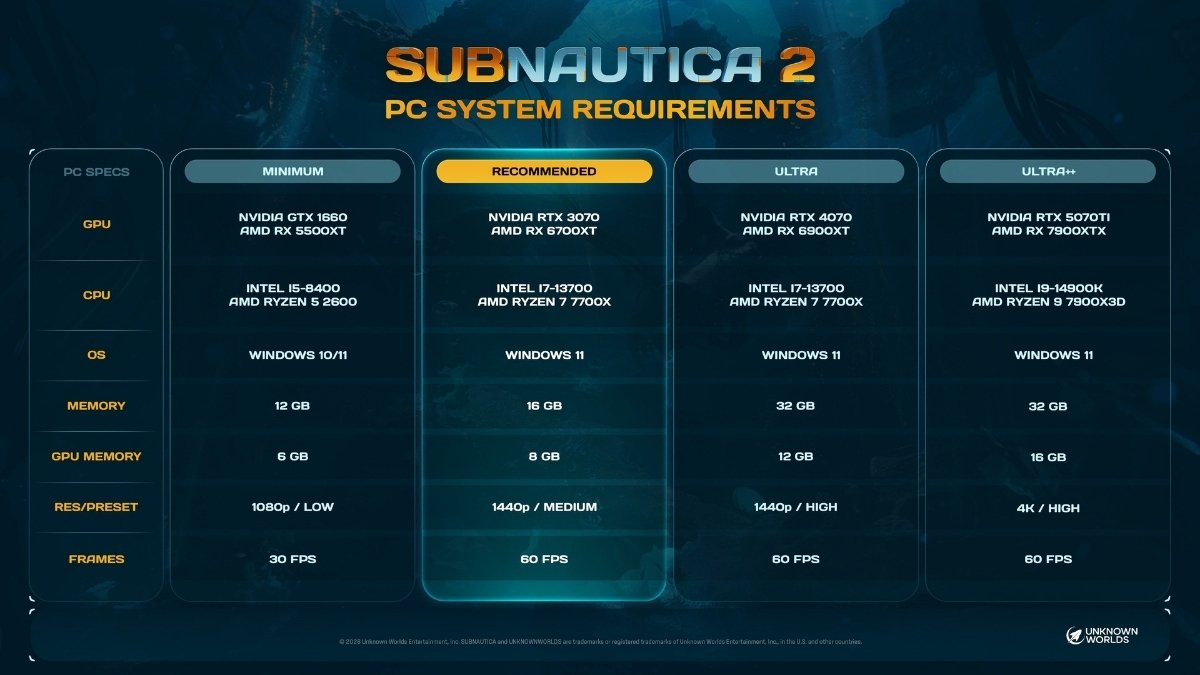
| RTX 5070 Ti | 4K High / 60 FPS — the official Ultra++ target |
| RTX 5080 / 5090 | 4K High/Epic mix, DLSS Quality, higher FPS target possible |
Best 4K Settings for AMD and Intel GPUs
AMD and Intel users are currently working with fewer upscaling options. Native FSR is not currently available in Subnautica 2 at this stage of Early Access — FSR is confirmed to be coming later. Until then, TSR (Temporal Super Resolution) is the safest fallback recommendation for AMD and Intel users.
TSR Quality is the recommended starting mode for AMD and Intel users. It renders below native 4K and upscales back to the target resolution, giving extra FPS while keeping image quality reasonably close to native. TSR Balanced is the next step down if you still need more FPS headroom.
AMD and Intel users should also pay closer attention to the settings that stress VRAM, particularly Textures and View Distance, as TSR does not recover performance as efficiently as DLSS on Nvidia hardware.
AMD GPU targets at 4K:
| GPU | Realistic 4K Target |
|---|---|
| RX 6700 XT | 1440p High; 4K not practical at this stage |
| RX 6900 XT | 1440p High/60 FPS; 4K may require TSR Balanced and reduced settings |
| RX 7900 XTX | 4K High / 60 FPS — the official Ultra++ target |
Settings to Lower First for Better FPS
When performance drops at 4K, these five settings give the largest gains when reduced from Epic to High. Work through them in this order:
Global Illumination is one of the highest-cost settings in Subnautica 2. It controls how light bounces through environments — the underwater lighting in the game is particularly demanding. Dropping this from Epic to High alone recovers significant frame rate.
Shadows at Epic can be expensive in Unreal Engine 5 games, and Subnautica 2 is no exception based on current testing. The difference between Epic and High shadows is noticeable in still screenshots but much harder to spot during active gameplay. Drop this early.
View Distance directly affects how much geometry and detail the game renders in the distance. In Subnautica 2’s open underwater environments, this is a major driver of frame rate variance. If you notice stutters specifically while swimming through open water or large biomes, this is the first setting to pull back.
Shading controls surface rendering complexity. It sits in the mid-range of cost but adds up alongside the other heavy settings. High is a reliable stopping point.
Effects covers particle systems and post-process effects — things like bioluminescent particles, water distortion, and explosion aftermath. These become particularly expensive in dense underwater scenes. High is the practical ceiling for most 4K rigs.
Can Subnautica 2 Run at 4K 60 FPS?
Yes, but the hardware requirement is high. Unknown Worlds’ system-requirements recommendations list the Ultra++ target at 4K/High/60 FPS, requiring an RTX 5070 Ti or RX 7900 XTX-class GPU, 32 GB of system RAM, and 16 GB of VRAM.
Cards below that tier — including the RTX 4070 and RX 6900 XT — are better treated as 1440p High/60 FPS cards based on the published spec targets. They may be able to run 4K with upscaling and reduced settings, but consistent 4K/60 should not be promised. The RTX 3070 and RX 6700 XT, which are Subnautica 2’s official recommended specs, are not suited for native 4K. Those cards are the target for 1440p Medium/High.
Subnautica 2 is in Early Access, which means optimization is ongoing. Performance will likely improve in future updates, and FSR support for AMD users is coming. The settings and targets in this guide reflect the game’s current state — for context on the lead-up to its launch, see our coverage. If you are playing through Xbox Game Pass, the same PC settings apply via the Windows version.
Best Settings for Smooth 4K Without Losing Visual Quality

If your goal is the best possible image at 4K without frame rate drops, this is the balanced profile that keeps the most visually important settings high while cutting the heaviest costs:
- Graphics Preset: High as the base
- Global Illumination: High
- Shadows: High
- View Distance: High
- Shading: High
- Effects: High
- Textures: Epic (if you have plenty of VRAM, ideally 16 GB) or High; drop to High if texture streaming issues appear
- Motion Blur: Off
- Upscaling: DLSS Quality (Nvidia) or TSR Quality (AMD/Intel)
- FPS Cap: 60
For many players, the visual gap between this profile and a full Epic preset should be small enough during normal play to justify the performance gain. The underwater environments in Subnautica 2 are lit and detailed enough that High settings read as high quality during actual play. The settings where Epic makes a perceptible difference — Global Illumination and Shadows — are precisely the ones that cost the most FPS.
Frequently Asked Questions
Does Subnautica 2 support DLSS? Yes. Nvidia RTX users can use DLSS Quality, Balanced, or Performance upscaling, as well as DLSS Frame Generation on supported cards.
Does Subnautica 2 support FSR? Not currently. AMD FSR support is planned but not yet available in Early Access. AMD and Intel users should use TSR as the fallback upscaling option.
Is Epic better than High at 4K? For most hardware, no. The FPS cost of Epic settings at 4K — particularly Global Illumination, Shadows, and Effects — is high enough that 60 FPS becomes difficult to sustain. High is the better 4K target.
What GPU do you need for 4K 60 FPS in Subnautica 2? The RTX 5070 Ti or RX 7900 XTX are the current 4K High / 60 FPS targets. Cards below that tier will need upscaling and reduced settings to hit 60 FPS at 4K.
Should I use DLSS Frame Generation? Only if your base frame rate is already stable. Frame Generation works by inserting frames between rendered ones, which adds latency and is less effective when the underlying FPS is low. Aim for a stable base above 45 FPS before enabling it.
