Category: GTA

  • Rockstar Editor Discontinued For PS4 And Xbox One: What Are The Implications For GTA 5 Players?

    Rockstar Editor Discontinued For PS4 And Xbox One: What Are The Implications For GTA 5 Players?

    Rockstar Games said today that from February 20, Rockstar Editor will no longer be available on PlayStation 4 and Xbox One platforms, and all user-uploaded clips will be destroyed.

    Rockstar Editor, which was first released in 2015, allows players to edit gameplay footage from Grand Theft Auto 5 and Grand Theft Auto Online and publish them to YouTube and the Rockstar Social Club, where other players may view them.

    The developer claims that the program’s removal from PlayStation 4 and Xbox One consoles is necessary to “support ongoing updates to these games on both platforms.”

    A short FAQ was posted on the Rockstar website to explain the program’s discontinuation in greater detail and to assist players in preserving their gameplay clips.

    Players on PC, PlayStation 5, and Xbox Series X|S will be unaffected, but PlayStation 4 and Xbox One users should download any clips posted through the video editing tool before they are erased on February 20.

    To avoid losing their Rockstar Editor clips, players should take the following steps:

    1. Open the Rockstar Editor
    2. Select Video Gallery
    3. Select the Project you want to Export
    4. Select Upload to YouTube, then yes
      1. If no YouTube account has been linked to your Rockstar Games account, then select Yes to continue to link your accounts
      2. Follow instructions to link your YouTube account to your Rockstar Games account
      3. Return to game after linking the accounts
    5. If you agree to the Sharing Policy, select Upload
    6. Confirm your video title, then the video description, tagging, etc.

    This will post the relevant clips to YouTube, where they can be viewed for years to come. Rockstar Games is presently working on the next installment in the GTA series, Grand Theft Auto 6.

    We appreciate your interest in our website! Make Gameempress.com your go-to site for gaming information.

  • GTA 6 Map Model: Dive Deep Into Vice City’s Sun-Kissed Secrets

    GTA 6 Map Model: Dive Deep Into Vice City’s Sun-Kissed Secrets

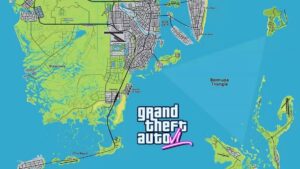
    A GTA 6 map model has already been created by a fan and can be downloaded right now. Just like in GTA V, the community has banded together for a mapping endeavor. They want to figure out what the map will look like before the game is released.

    Starting with gameplay leaks in 2022, the community was able to put together some areas of the map. The first official trailer provided them with a lot more to work with, and it allowed for some more accuracy.

    GTA 6 Map Model

    A fan provided an example in which the real-life Loews Hotel in Miami appears four times throughout the GTA VI video. Even though we are still in the early phases, we have made significant progress in a short time.

    GTA 6 map model
    GTA 6 map model

    It’s also worth noting that anything we see in the clip may change before 2025. GTA V’s debut trailer is incredible and unforgettable. However, it included photos in which parts of the map were not loaded. We also know from recent leaks that the game changed in the last several years before release.

    Despite the errors in the community map and final game, this project is a lot of fun to watch and participate in. GTA VI’s map is already proving to be more challenging to map out due to its size and extensive range of content, but that is what makes it even more intriguing.

    The 3D Model

    YouTuber Dark Space developed a 3D model of the map based on footage from the first GTA VI trailer and the community map. It allows us to see the game’s universe from different perspectives than the trailer pictures.

    It is currently at an early stage of development. However, accuracy is already taking shape. Dark Space superimposed his map on the trailer, and you can see a lot of similarities. Using the shots in the trailer and leaked footage, an approximate placement for the places was determined.

    Dark Space has also compared the size of the GTA VI map to that of GTA IV and V. It is obvious that Leonida will be larger than the maps found in GTA V and GTA IV, but that is only part of the story. Outside of Los Santos, much of San Andreas was similar, whereas the Leonida map appears to have more variety. The Everglades are only one example.

    Based on this 3D model, Vice City can accommodate the full GTA VI map as well as Los Santos. Leaks have revealed various urban town/city areas far from Vice City. This differs from GTA V. It does, however, contain significantly more water, which is something to consider.

    Dark Space contacted us, stating that he had made his model available for free download. This means that anyone who wishes to collaborate on the project can do so using this paradigm.

    He has also permitted you to use it in your content; however, you must give him credit. You can get the model here and contribute to it. We’d also recommend watching Dark Space’s YouTube video, which provides additional insight into his model and process.

    It’s nice to see the GTA community come together again. It was a lot of fun over a decade ago to follow up with community mapping developments before GTA V came out, and this time is no exception. Leonida appears to be Rockstar’s greatest game world ever, and it is offering gamers an enjoyable task.

    Speaking of GTA communities coming together, one GTA RP server recently purchased a PC for a new member going through a difficult period.

    We appreciate your interest in our website! Make Gameempress.com your go-to site for gaming information.

  • GTA Online Updates: Gear Up For Drag Races And Animal Encounters!

    GTA Online Updates: Gear Up For Drag Races And Animal Encounters!

    Rockstar Games has launched a new GTA Online update. This is a simple patch that addresses a few issues. Some users were surprised to see an update emerge unexpectedly on their PS5. At the time of recording, this update had only been released on the PlayStation 5.

    GTA Online Update

    The download size is roughly 200 MB. Here’s a screenshot of the PS5 update being downloaded, thanks to @Gtamen.

    Rockstar Support has posted the patch notes on their website, which we have listed below.

    Fixes

    • Fixed an issue that resulted in a loss of audio when using Dolby Atmos
    • Fixed an issue that could result in a crash when exiting to the Landing Page

    These types of upgrades in between big content updates only occur when critical fixes are required. In this scenario, GTA V crashed on the landing page, and the audio was also falling out.

    Another thing Rockstar Games released today was a tunable background update; at this time, we are not sure what it contains.

    However, a background update was issued yesterday, and thanks to Tez2, we know what it includes:

    • Fixes a bug causing Auto Shop Client Deliveries to disappear and customization orders to be bugged out
    • Fixes a bug where the Nightclub chair disappears and the player is stuck not being able to exit the building.
    • Fixes a bug causing missions launched from the Nightclub or Vehicle Warehouse computer to not launch properly.
    • Fixes a bug where a second player or more ends up stuck inside the building after the intro cutscene during VLP Intelligence.
    • Patches out an Acid Lab super glitch.
    • Patches out Account Duplication glitch.

    You might also be interested in the following game, patch notes: Warcraft Rumble 3.0.0 Patch Notes and God Of War Ragnarok Valhalla 05.03 Patch Notes. We appreciate your interest in our website! Make Gameempress.com your go-to site for gaming information.

  • GTA 6 Trailer 2 Release Date Speculated: New Hints And Teasers Analyzed

    GTA 6 Trailer 2 Release Date Speculated: New Hints And Teasers Analyzed

    The initial GTA 6 trailer captivated the gaming community, and it is still one of the most-watched videos on numerous social media platforms.

    While fans await the impending announcements, a fan account on X called @GTAVI_Countdown has speculated on when Rockstar Games will release the next video.

    The dates listed below are based on fan speculation and do not reflect Rockstar Games’ official plans for the game. Readers are cautioned to treat the information with caution.

    GTA 6 Trailer 2 Release Date Speculated

    @GTAVI_Countdown shared the aforementioned post on January 12, 2024, in which they stated the four likely release dates for Grand Theft Auto 6 teaser 2:

    • May 28, 2024
    • October 16, 2024
    • November 14, 2024
    • December 17, 2024

    Interestingly, the individual also revealed why they predicted the aforementioned dates.

    Despite being over a month old, the Grand Theft Auto 6 trailer 1 is still considered new by Rockstar Games. The studio has a history of leaving significant gaps between project reveals. Rockstar is also known for unexpectedly surprising fans.

    As a result, the exact release date of the next trailer cannot be predicted until the developer officially announces it.

    While the theories appear to be intriguing, fans appear to be unimpressed. Many users made amusing predictions based on the original post’s theories.

    The initial GTA 6 teaser smashed several records around the world, as it was one of the most anticipated reveals in recent memory.

    Rockstar Games is a specialist at creating buzz for its project releases, and the next trailer may also be expected following a significant hype cycle.

    What Can We Expect From The Second Trailer for Grand Theft Auto 6?

    The first trailer showed us the HD Universe Vice City, some of the characters, including Lucia, and the open-world elements. The community is cheering for Jason to be the second protagonist, and we may expect to see him in the next trailer.

    While the first teaser focused on GTA 6 protagonist Lucia, the second video is believed to center on Jason and his tale.

    We appreciate your interest in our website! Make Gameempress.com your go-to site for gaming information.

  • GTA 6 Limited Weapon System Rumor: Could This Be The Future Of Action Games?

    GTA 6 Limited Weapon System Rumor: Could This Be The Future Of Action Games?

    With GTA 6 on the horizon, fresh speculations about the game seem to emerge every other day. While most are false speculations, others have piqued the community’s interest. According to a long-circulating online rumor, Grand Theft Auto 6 will introduce a limited-weapon system to the franchise.

    This could be comparable to Red Dead Redemption 2‘s weapon-carrying system, in which players can only carry a certain amount of guns at once. While this is good for realism, it has irritated some fans who desire a complete inventory like in prior GTA games.

    Rockstar Games has not yet provided any details about this, but the rumor has already divided the gaming world. Others are opposed to the functionality being implemented by the studio.

    GTA 6 Limited Weapon System Rumor

    In a tweet made by user @Doonishsan on X, they voiced their thoughts on the likelihood of a limited-weapon system in GTA 6. Others responded by saying that a similar feature in Red Dead Redemption 2 worked flawlessly and will make the forthcoming title feel more genuine.

    According to the rumor, players will be limited to carrying two handguns and one rifle at the same time. They will, however, be able to keep more weapons in the trunk of their automobile and access them whenever they choose.

    This is comparable to how Arthur could keep his weapons on his horse and utilize them as needed. Many players would like to see this realistic feature from RDR 2 in GTA 6.

    As previously said, the rumor has spurred discussion within the Grand Theft Auto 6 community. Here are a few noteworthy reactions to the post:

    There are also reports that the studio may include a car refueling system in which automobiles run out of gas and players must either abandon them or find a refilling station. This has also prompted some heated disputes among fans.

    However, these are only rumors, and Rockstar Games has yet to make an official remark on the subject. However, if the studio decides to draw influence from the features and gameplay mechanics of Red Dead Redemption 2, they may include a limited-weapon system or something similar in GTA 6.

    You might also be interested in the following game, GTA 6: GTA 6 At 60fps Concerns and Is GTA 6 Only For PS5. We appreciate your interest in our website! Make Gameempress.com your go-to site for gaming information.

  • Major Events Of 2023: From The Announcement Of GTA 6 To The GTA 5 Data Leak

    Major Events Of 2023: From The Announcement Of GTA 6 To The GTA 5 Data Leak

    The release of GTA 6’s first official teaser was cause for celebration, but situations such as Grand Theft Auto 5’s source code being leaked around Christmas compounded Rockstar Games’ woes. The latter not only divulged details about the 2013 title, but also about previously unannounced projects such as Bully 2, Midnight Club 5, and others.

    In a nutshell, Rockstar Games has had a mixed bag of a year. In this post, we will look back at five key studio-related events that occurred in 2023.

    GTA 6 Trailer Release and Four Other Important Events in 2023

    Will GTA 6 Be On PS4
    Will GTA 6 Be On PS4

    Grand Theft Auto 5 Has Been Added to the Playstation Plus Game Catalog

    GTA 5 is now available for free to PS Plus Extra and Premium customers. As long as their PS Plus Extra or Premium subscription is current, they can access the title from the PS Plus Game Catalog on PS4 and PS5. Its download size on PS4 is 91.357 GB and 95.945 GB on PS5.

    This isn’t the first time the game has been made available for free. It was released for free on Epic Games Launcher in 2020. That, however, was only for a brief period.

    Unannounced Project Details Released

    As previously noted, the GTA 5 source code leak revealed a wealth of information concerning unreleased Rockstar Games projects. These include highly anticipated projects such as Bully 2 and Midnight Club 5, a sequel to Rockstar’s racing video game franchise that includes titles such as Midnight Club: Los Angeles.

    The most famous appears to be a canceled game called Agent. It would have been set during the Cold War, and its map would have been disclosed as a result of the source code leak incident. Aside from that, little is known about Agent at the moment.

    Source Code for Grand Theft Auto 5 Has Been Leaked

    GTA 5 source code was released around Christmas 2023, casting a damper on Rockstar Games’ otherwise excellent year. This incident exposed a lot about the studio’s 2013 title, including canceled story mode DLCs and map extensions.

    In reality, Rockstar may have planned to feature Liberty City in some fashion. These expansions may never see the light of day, as the studio’s primary focus over the last decade has been Grand Theft Auto Online, with Grand Theft Auto 6 likely to take center stage in the future.

    GTA 6 Trailer Release

    On December 5, 2023, Rockstar Games released the first official trailer for Grand Theft Auto 6. It corroborated many of the details shown in the September 2022 leaked development film, as well as several others. Vice City will return in the sequel, which will be based in the fictional state of Leonida.

    The game will also include a female protagonist named Lucia, about whom fans are eager to learn more. Grand Theft Auto 6 is planned to be released in 2025 for PS5 and Xbox Series X/S, and more information, such as the voice actor, may be given ahead of time.

    Grand Theft Auto 5’s 10th Anniversary

    On September 17, 2023, Grand Theft Auto 5 celebrated its tenth anniversary. In the last decade, the game has been one of Rockstar’s most valuable properties. As of this writing, it has sold around 190 million units and is expected to sell even more until its sequel arrives in 2025.

    To commemorate the anniversary, Rockstar distributed free in-game goods in GTA Online, such as clothes based on the game’s three protagonists, Michael De Santa, Trevor Philips, and Franklin Clinton.

    Unfortunately, GTA 5’s 10th anniversary was a letdown. While the collectibles are a fantastic addition, the event might have been much larger.

  • What Does The Ardent Do In GTA 5? A Guide To The Weaponized Car

    What Does The Ardent Do In GTA 5? A Guide To The Weaponized Car

    The Ardent is a weaponized car that was added to GTA 5 Online as part of the Gunrunning update in 2017. The car is based on the Lotus Esprit, a classic sports car that featured in several James Bond movies.

    The Ardent has two front-mounted machine guns that can be used to shoot enemies and vehicles. However, the Ardent also has some limitations and drawbacks that make it less effective than some other weaponized cars in the game. In this article, we will explain what the Ardent does in GTA 5, and how to use it properly.

    How to Get the Ardent in GTA 5?

    What Does The Ardent Do In GTA 5
    What Does The Ardent Do In GTA 5

    To get the Ardent in GTA 5, you will need to follow these steps:

    • Buy the Ardent from the Warstock Cache & Carry website. The Ardent costs $1,150,000, and can be delivered to your garage or your Mobile Operations Center (MOC).
    • Customize the Ardent at the MOC or the Avenger Workshop. You can change the color, the wheels, the performance, and the armor of the car. You can also add some cosmetic features, such as spoilers, bumpers, or hoods. However, you cannot change the weapons or the windows of the car.
    • Use the Ardent in free mode or missions. You can drive the Ardent like any other car, and use the machine guns by pressing the right button on the controller or the keyboard. You can also store the Ardent in your garage or your MOC, and request it from the mechanic or the interaction menu.

    How to Use the Ardent in GTA 5?

    To use the Ardent in GTA 5, you will need to consider these tips and tricks:

    • Use the machine guns wisely. The machine guns can deal moderate damage to enemies and vehicles, but they have a limited range and accuracy. They are also not very effective against armored or weaponized vehicles, such as tanks, helicopters, or jets. You can use machine guns to fight enemy NPCs, such as gang members, cops, or mercenaries, or to fight enemy players on foot or in regular cars. However, you should avoid using machine guns against players with more powerful weapons or vehicles, as they can easily destroy your car or kill you.
    • Use the speed and agility of the car. The Ardent has good speed and acceleration, as well as decent handling and braking. You can use the speed and agility of the car to outrun or outmaneuver your pursuers, or to chase your targets. You can also use the speed and agility of the car to perform stunts, jumps, or drifts, and to explore the map. However, you should be careful not to crash or flip your car, as it can damage your car or expose you to enemy fire.
    • Use the stealth and appearance of the car. The Ardent has a stealthy and elegant appearance, which makes it blend in with other cars on the road. You can use the stealth and appearance of the car to surprise or deceive your enemies, or to avoid unwanted attention. You can also use the stealth and appearance of the car to infiltrate certain areas or missions, such as the casino heist or the import/export business. However, you should be aware that the stealth and appearance of the car can also make you a target for other players who want to steal or destroy your car.

    Benefits and Drawbacks of the Ardent in GTA 5

    The Ardent has some benefits and drawbacks in GTA 5, such as:

    Benefits

    • You can get a rare and unique car that is not available in any other way. The Ardent is one of the few weaponized cars in the game, and it has a distinctive design and style. The Ardent can also be a great addition to your collection and your garage.
    • You can get a fun and versatile car that can perform well in different situations. The Ardent can be used for combat, racing, stunts, exploration, or stealth, and it can offer more variety and options than some other cars in the game.
    • You can get a classy and cool car that can impress your friends and rivals. The Ardent has a sleek and sophisticated appearance, and it can make you look like a spy or a millionaire. The Ardent can also be a great companion and a loyal friend, as it can protect you and help you in your adventures.

    Drawbacks

    • You may have to spend a lot of money and resources to get and maintain the Ardent. The Ardent is very expensive, and it can be hard to afford or save up for. The Ardent also requires a lot of maintenance and repairs, as it can be easily damaged or destroyed by enemies or accidents.
    • You may have to deal with some limitations and challenges when using the Ardent. The Ardent has some flaws and weaknesses, such as weak weapons, fragile windows, and low armor. The Ardent can also be hard to control or maneuver, especially at high speeds or on rough terrain.
    • You may have to face some competition and hostility from other players when using the Ardent. The Ardent can attract a lot of attention and envy from other players, who may want to challenge, attack, or rob you. The Ardent can also be a liability or a hindrance, as it can make you a target or a suspect for the police or the enemies.

    This is everything you need to know about What Does The Ardent Do In GTA 5. You can also read our guides on 10 Tips Every GTA Player Should Know and GTA SA Weapons Show White. Stay up to date with GameEmpress.com for the most recent gaming news and guides.

  • How To Save Outfits In GTA 5? A Complete Guide For Fashion Lovers

    How To Save Outfits In GTA 5? A Complete Guide For Fashion Lovers

    GTA 5, or Grand Theft Auto V, is a popular open-world action-adventure game that lets you explore the city of Los Santos and its surrounding areas. The game features rich and diverse gameplay, with various missions, activities, and challenges to complete. One of the aspects that makes GTA 5 so enjoyable and immersive is the ability to customize your character’s appearance, style, and personality.

    You can choose from a wide range of clothing items, accessories, and hairstyles, to create your unique look. But how can you save your outfits in GTA 5, so that you can easily switch between them, or show them off to your friends? In this article, we will show you how to save outfits in GTA 5, using different methods and tips. Whether you are a casual player or a fashion enthusiast, this guide will help you make the most of your GTA 5 wardrobe.

    How to Save Outfits in GTA 5 Using Wardrobes?

    Gta 5 10th Anniversary Date
    Gta 5 10th Anniversary Date

    The simplest and most common way to save outfits in GTA 5 is to use wardrobes. Wardrobes are furniture items that can be found in various locations in the game, such as safe houses, apartments, or clothing stores. Wardrobes allow you to access your clothing inventory, and create, edit, or delete outfits. To save outfits in GTA 5 using wardrobes, follow these steps:

    • Go to a location that has a wardrobe, such as your safe house, apartment, or clothing store.
    • Approach the wardrobe and interact with it. You will see a menu with different options, such as Tops, Pants, Shoes, Accessories, and Outfits.
    • Select the Outfits option. You will see a list of your saved outfits, as well as empty slots that you can use to create new outfits.
    • Select an empty slot to create a new outfit. You will see a preview of your character wearing the outfit, as well as the name and price of the outfit.
    • To customize your outfit, you can use the left and right arrows to browse through different clothing categories, such as Tops, Pants, Shoes, Accessories, and so on. You can also use the up and down arrows to browse through different items within each category. To select an item, press the confirm button.
    • To change the name of your outfit, press the rename button. You can enter a custom name for your outfit, using the keyboard or the controller.
    • To save your outfit, press the save button. You will see a confirmation message that your outfit has been saved.
    • To exit the wardrobe, press the back button.

    How to Save Outfits in GTA 5 Using the Interaction Menu?

    Another way to save outfits in GTA 5 is to use the interaction menu. The interaction menu is a feature that allows you to access various options and settings in the game, such as inventory, map, contacts, and so on.

    The interaction menu can be accessed by holding the select button on your controller, or the M key on your keyboard. To save outfits in GTA 5 using the interaction menu, follow these steps:

    • Open the interaction menu by holding the select button on your controller, or the M key on your keyboard.
    • Navigate to the Style option. You will see a list of different options, such as Outfit, Helmet, Glasses, and so on.
    • Select the Outfit option. You will see a list of your saved outfits, as well as empty slots that you can use to create new outfits.
    • Select an empty slot to create a new outfit. You will see a preview of your character wearing the outfit, as well as the name and price of the outfit.
    • To customize your outfit, you can use the left and right arrows to browse through different clothing categories, such as Tops, Pants, Shoes, Accessories, and so on. You can also use the up and down arrows to browse through different items within each category. To select an item, press the confirm button.
    • To change the name of your outfit, press the rename button. You can enter a custom name for your outfit, using the keyboard or the controller.
    • To save your outfit, press the save button. You will see a confirmation message that your outfit has been saved.
    • To exit the interaction menu, press the back button.

    How to Save Outfits in GTA 5 Using the Quick Save Feature?

    Another way to save outfits in GTA 5 is to use the quick save feature. The quick save feature is a feature that allows you to save your game progress, as well as your character’s appearance, without using a wardrobe or the interaction menu.

    The quick save feature can be accessed by using your phone in the game, which can be accessed by pressing the up button on your controller, or the T key on your keyboard. To save outfits in GTA 5 using the quick save feature, follow these steps:

    • Open your phone in the game by pressing the up button on your controller, or the T key on your keyboard.
    • Navigate to the Quick Save app, which is represented by a floppy disk icon. You will see a list of your saved games, as well as empty slots that you can use to create new saves.
    • Select an empty slot to create a new save. You will see a preview of your character wearing the outfit, as well as the name and date of the save.
    • To save your game and your outfit, press the confirm button. You will see a confirmation message that your game and your outfit have been saved.
    • To exit your phone, press the back button.

    How to Switch Between Saved Outfits in GTA 5?

    Once you have saved your outfits in GTA 5, you can easily switch between them, depending on your mood, situation, or preference. There are different ways to switch between saved outfits in GTA 5, such as using wardrobes, the interaction menu, or the quick menu. To switch between saved outfits in GTA 5, follow these steps:

    • Using wardrobes: Go to a location that has a wardrobe, such as your safe house, apartment, or clothing store. Approach the wardrobe and interact with it. Select the Outfits option. You will see a list of your saved outfits. Select the outfit that you want to wear, and press the confirm button. You will see a preview of your character wearing the outfit, as well as the name and price of the outfit. To exit the wardrobe, press the back button.
    • Using the interaction menu: Open the interaction menu by holding the select button on your controller, or the M key on your keyboard. Navigate to the Style option. Select the Outfit option. You will see a list of your saved outfits. Select the outfit that you want to wear, and press the confirm button. You will see a preview of your character wearing the outfit, as well as the name and price of the outfit. To exit the interaction menu, press the back button.
    • Using the quick menu: Open the quick menu by pressing the left button on your controller, or the Q key on your keyboard. Navigate to the Outfit option. You will see a list of your saved outfits. Select the outfit that you want to wear, and press the confirm button. You will see a preview of your character wearing the outfit, as well as the name and price of the outfit. To exit the quick menu, press the back button.

    This is everything you need to know about the How To Save Outfits In GTA 5?. You can also read our guides on 10 Tips Every GTA Player Should Know and GTA SA Weapons Show White. Stay up to date with GameEmpress.com for the most recent gaming news and guides.

  • 10 Tips Every GTA Player Should Know: Guns, Cars, Cash

    10 Tips Every GTA Player Should Know: Guns, Cars, Cash

    GTA Online is a game that has been around for over a decade and has plenty of useful ideas for gamers to use. Hardcore players should be aware of all of this, but novices and even casual veterans may be oblivious.

    This article will highlight five useful ideas and methods to help you get through the day. All of the entries were relevant as of the San Andreas Mercenaries update and should continue to be usable in future versions unless Rockstar Games modifies a related feature significantly.

    Anyone can become proficient in GTA Online if they take the time to grasp some of the game’s minor nuances. Some of the following features aren’t explicitly disclosed to the player, so it’s a good idea to be aware of them and use them later.

    10 Tips Every GTA Player Should Know

    Jojoy GTA 5
    Jojoy GTA 5

    1.) Purchasing Ammunition From The Interaction Menu

    In GTA Online, here’s how to collect ammo from anywhere on the map:

    • Open the Interaction Menu.
    • Choose Inventory.
    • Select the Ammo choice.
    • Purchase whatever ammunition you desire. If you go to the left or right a little, you should see an option to purchase it for all of your guns at once.

    As a result, players no longer need to visit Ammu-Nation or associated shops to purchase weaponry. While this Interaction Menu technique makes the process considerably easier, players should bear in mind that it isn’t free because ammo is required.

    Knowing this trick is still incredibly useful because there may be situations where a player runs out of ammunition, and being able to acquire it from any place can be a lifesaver.

    2.) Purchase Bulletproof Helmets

    Players in GTA Online who are concerned about PvP should realize that wearing a bullet-resistant helmet is preferable to not having one. Certain helmets allow the user to endure one or two headshots. Without them, a single bullet to the head would kill the player.

    Bullet-resistant helmets are typically those that seem like they might be worn by a member of the military. Make careful to save one outfit with the helmet equipped so you can utilize it every time you enter the PvP realm.

    3.)Take a chopper

    Because San Andreas is such a large area, hijacking a chopper can be a major time saver. Given that even one of Elitas Travel’s less expensive ‘copters (the $780,000 Buckingham Maverick) will drain your bank account, your change purse will be grateful.

    The easiest one to steal is near the flying school at Los Santos International Airport. You can vault the surrounding fence and claim it for yourself with some skilful driving. Let the skyward crime begin!

    4.) Save Money Before Purchasing A Business

    After years of upgrades and expansions, you can now engage in a wide range of illegal enterprises, from nightclubs and arcades to celebrity agencies and drub laboratories, however, each one requires a significant investment to establish by obtaining the necessary property and equipment.

    As a result, you should search around to see what enterprises are accessible, then focus on one to get started so that you don’t spread your resources too widely over many endeavours. When you choose a location for your business, there will often be several add-ons available for a fee, but you can always go back and bolt these on later, so don’t worry about needing to buy everything at once.

    5.) Maintain Heist Activity

    Maintaining a heist in progress will ensure that you are invited by Lester to continue the heist whenever you are online during a session. If you accept the phone call invitation, you will be taken immediately to the spot, saving you time and safeguarding you from ice.

    Bonus tip: If you have both doomsday and the ordinary heist running, you may rapidly go between the facility and your flat.

    6.) Sell Cars For Easy Cash

    Whenever you need some additional cash, go to the nearest Los Santos Customs. If you modify the cars you steal, they can be sold for a higher price.

    Remember that you can only sell one automobile every day, and a day in-game lasts approximately 45 minutes. Remember to lock your car so you don’t end up losing your ride.

    7.) Use A Bank

    Instead of carrying all of your cash around, deposit it with a bank. If you are robbed, you will not lose all of your cash on hand. The game allows you to deposit dollars using your phone, saving you time at the ATM.

    You might think that $5000 isn’t a lot of money in GTA, but every little bit adds up, so save your money and it will pay benefits in the long run.

    8.) Insurance Pays Off

    Getting insurance in GTA Online is a no-brainer. If you want to keep your cars, you need to buy insurance. In this instance, if your automobile is stolen, the firm will replace it for a price of 10% of the insurance premium.

    It should be noted that only vehicles equipped with a tracking system will be eligible for insurance. If you get a garage, every automobile you store in it will be equipped with a tracker.

    9.) Expect Some Griefers

    Griefing is a given in an online environment where players can murder one another without penalty. It’s impossible to avoid the fact that many high-level players would rush at the chance to prey on low-level ones; such is the cycle of life in GTA Online.

    As a result, anticipating this type of welcome human behaviour is an important element of the experience. Intentional trolling or outright destroying the fun for others is not uncommon in GTA Online, as it is in other competitive online games.

    10.) Purchase a High End Apartment

    Before you can enjoy GTA Online’s fantastic heists, you must first reach level 12. Importantly, if you want to design these multi-part assignments yourself and hence have control over how the pay is divided, you’ll also need to purchase a high-end residence.

    These posh apartments include planning boards, which are essential for robbery preparations, and the ‘cheapest’ can be found in Del Perro Heights. Visit the Dynasty 8 Real Estate app on your character’s phone to purchase the property for $200,000. More information on obtaining properties may be found in our tutorial on how to buy a house in GTA Online.

    This is everything you need to know about the 10 Tips Every GTA Player Should Know. You can also read our guides on Vapid Aleutian GTA 5 and GTA 5 Graphics Mod. Stay up to date with GameEmpress.com for the most recent gaming news and guides.

  • GTA SA Weapons Show White: How To Fix The Texture Glitch?

    GTA SA Weapons Show White: How To Fix The Texture Glitch?

    GTA SA, or Grand Theft Auto: San Andreas, is a classic open-world action-adventure game that was released in 2004. The game is set in the fictional state of San Andreas, which is based on California and Nevada and follows the story of Carl Johnson, a former gangster who returns to his hometown after his mother’s death.

    The game features a variety of weapons, such as pistols, shotguns, rifles, and explosives, that can be used to fight enemies, complete missions, or cause chaos.

    However, some players have reported a texture glitch that causes the weapons to show white in the game. This glitch can affect the appearance and performance of the weapons, and make the game less enjoyable.

    GTA SA Weapons Show White

    GTA SA Weapons Show White
    GTA SA Weapons Show White

    The glitch can be caused by various factors, such as corrupted files, outdated drivers, incompatible mods, or low graphics settings. Fortunately, some possible solutions can help you fix the glitch and restore the normal colours of the weapons. Here are some of them:

    Solution 1: Verify the Integrity of Game Files

    One of the possible causes of the texture glitch is corrupted or missing game files, which can happen due to improper installation, deletion, or modification. To fix this, you can verify the integrity of the game files, which is a process that checks and repairs any errors or discrepancies in the game files. You can verify the integrity of the game files by following these steps:

    • Launch Steam and go to your Library.
    • Right-click on GTA SA and select Properties.
    • Go to the Local Files tab and click on Verify Integrity of Game Files.
    • Wait for the process to complete and then launch the game.

    Solution 2: Update Your Drivers

    Another possible cause of the texture glitch is outdated or faulty drivers, which are software that helps your hardware communicate with your OS and applications. Outdated or faulty drivers can cause compatibility issues, performance problems, or graphical errors.

    To fix this, you can update your drivers, which is a process that installs the latest and most compatible versions of the drivers for your hardware. You can update your drivers by following these steps:

    • Press the Windows key and type Device Manager. Then, click on the Device Manager app that appears.
    • Expand the Display Adapters category and right-click on your graphics card. Then, select Update Driver.
    • Choose Search automatically for updated driver software and follow the on-screen instructions.
    • Repeat the same steps for the Sound, Video and Game Controllers category and your sound card.
    • Restart your computer and launch the game.

    Solution 3: Remove or Disable Any Mods

    Another possible cause of the texture glitch is incompatible or conflicting mods, which are modifications that add or change features, content, or gameplay of the game. Mods can enhance or customize the game, but they can also cause bugs, crashes, or glitches, especially if they are not compatible with the game version, the other mods, or the hardware.

    To fix this, you can remove or disable any mods that you have installed, which is a process that restores the game to its original state. You can remove or disable any mods by following these steps:

    • Go to the folder where you installed the game, which is usually C:\Program Files (x86)\Steam\steamapps\common\Grand Theft Auto San Andreas.
    • Look for any folders or files that are related to the mods, such as modloader, cleo, or gta_sa.exe. Then, delete or move them to another location.
    • Alternatively, you can use a mod manager, such as SAMI or Mod Loader, to uninstall or deactivate the mods.
    • Launch the game and check if the glitch is fixed.

    Solution 4: Adjust Your Graphics Settings

    Another possible cause of the texture glitch is low or incorrect graphics settings, which are options that affect the visual quality and performance of the game.

    Low or incorrect graphics settings can cause the game to run poorly, or to display the textures incorrectly. To fix this, you can adjust your graphics settings, which is a process that optimizes the game for your hardware and preferences. You can adjust your graphics settings by following these steps:

    • Launch the game and go to the Options menu.
      Go to the Display Setup sub-menu and adjust the following settings:
    • Resolution: Set it to the highest value that your monitor and graphics card can support.
    • Draw Distance: Set it to the highest value that your graphics card can handle without lagging.
    • Frame Limiter: Set it to On, which will limit the game to 30 FPS and prevent any glitches or bugs.
    • Visual FX Quality: Set it to Very High, which will improve the quality of the textures and effects.
    • Mip Mapping: Set it to On, which will smooth the edges of the textures and reduce aliasing.
    • Antialiasing: Set it to 3, which will further smooth the edges of the textures and reduce aliasing.
    • Save the settings and restart the game.

    Conclusion

    GTA SA is a classic open-world action-adventure game that features a variety of weapons that can be used to fight enemies, complete missions, or cause chaos. However, some players have reported a texture glitch that causes the weapons to show white in the game.

    This glitch can affect the appearance and performance of the weapons, and make the game less enjoyable. The glitch can be fixed by verifying the integrity of game files, updating the drivers, removing or disabling any mods, or adjusting the graphics settings. These solutions can help you fix the glitch and restore the normal colours of the weapons.

    This is everything you need to know about the GTA SA Weapons Show White. You can also read our guides on Diablo 4 Uber Lilith Guide and Iron Leaves Raid Guide. Stay up to date with GameEmpress.com for the most recent gaming news and guides.

  • Grand Theft Auto 6 Hacker Arion Kurtaj: From Teen Sensation To Secure Hospital Walls

    Grand Theft Auto 6 Hacker Arion Kurtaj: From Teen Sensation To Secure Hospital Walls

    Rockstar Games released the first trailer for Grand Theft Auto VI (GTA 6) earlier this month. Unfortunately for the developer, fans had seen the GTA 5 sequel long before the trailer was released.

    In 2022, a hacker organization known as Lapsus$ leaked approximately 90 videos of GTA 6 gameplay. Arion Kurtaj, the person who played a key part in releasing the videos, has now been condemned to life in a hospital prison.

    Lapsus$ is well-known for carrying out cyberattacks against some of the world’s greatest technology companies, including Microsoft, Nvidia, and Uber. The multinational gang’s mastermind is none other than Arion, who is only 18 years old.

    Arion was arrested in January 2022 for hacking BT and EE. However, he was released shortly afterwards while being investigated. Arion was arrested again in March 2022. This time for launching a cyberattack against Nvidia.

    Then, according to the BBC, Kurtaj was “moved into a Travelodge hotel in Bicester for his safety and given strict bail conditions including a ban from going on the internet.” However, this did not deter him from hacking.

    Arion Used an Amazon Fire TV Stick to Hack Rockstar

    While on bail, he carried out his most well-known cyberattack, on Rockstar Games. He accomplished this by utilizing only an Amazon Fire Stick linked to a TV in the hotel, which allowed him to connect to cloud computing services, as well as a recently purchased smartphone, keyboard, and mouse. This is when the police re-arrested and detained Arion in preparation for his trial.

    Doctors judged Arion unsuited for the trial due to his Autism. In other words, the jury was “asked to determine whether or not he did the acts alleged – not if he did it with criminal intent.”A mental health assessment that was used as a part of the sentencing hearing said he “continued to express the intent to return to cyber-crime as soon as possible. He is highly motivated.” Reportedly, Arion was also violent while he was in custody with “dozens of reports of injury or property damage.”

    You might also be interested in the following games, News: The Day Before PS5 Release Date and Starfield Steam Reviews. We appreciate your interest in our website! Make Gameempress.com your go-to site for gaming information.

  • GTA 5 Leaked Source Code Exposed: Secrets Of Los Santos Spilled Online

    GTA 5 Leaked Source Code Exposed: Secrets Of Los Santos Spilled Online

    Following the release of Insomniac, it appears that GTA developer Rockstar Games has been targeted by leakers.

    The whole source code of Grand Theft Auto has been publicly released, according to claim by prominent YouTuber SKizzle on earlier today.

    The leak also included information on Bully and the next Grand Theft Auto title, Project Americas.

    GTA 5 Leaked Source Code

    As stated in the previous post, @GTA Focal even released a screenshot of the leaked GTA 5 source code, proving the report’s veracity. According to the data, Rockstar was also working on a possible successor to the critically successful video game Bully.

    Another rumour on X states that the source code has been released in a Discord channel, the name of which has not been revealed to prevent the material from spreading.

    fan known as “Agent” also posted their portion of the GTA source code dumps as well as photographs showing Rockstar Games’ RAGE engine on X. However, their post has since been removed.

    The source code for Grand Theft Auto was allegedly leaked alongside the leaked video last year. It was never made public, however, until today.

    This is significant data loss for the developer, and it may have ramifications for both current and future series participants.

    Popular online reporter Gaming Detective (@that1detectiv3) also highlighted the potential consequence of the leaked source code, which could result in delays for Rockstar Games’ upcoming Grand Theft Auto 6.

    At the time of writing, Rockstar Games has not responded to the leak. Fans are asked to appreciate the developers’ hard work and refrain from disseminating the leaked source code further.

    You might also be interested in the following games, Leaks: Genshin 4.4 Release Date, Leaks and Genshin Impact Leaks Kit. We appreciate your interest in our website! Make Gameempress.com your go-to site for gaming information.

  • Vapid Aleutian GTA 5: How To Get, Customize, And Use The New SUV?

    Vapid Aleutian GTA 5: How To Get, Customize, And Use The New SUV?

    Vapid Aleutian is a new SUV that was added to GTA 5 Online as part of the December 2023 update. The vehicle is based on the real-life Ford Expedition and features a sleek design, a spacious interior, and a powerful engine.

    The vehicle also comes with some unique features, such as armor plating, slick mines, a remote control unit, and a missile lock-on jammer, that can be upgraded at an Agency Workshop.

    In this article, we will show you how to get, customize, and use the Vapid Aleutian in GTA 5 Online. We will also provide some tips and tricks on how to make the most of this versatile vehicle.

    How to Get the Vapid Aleutian in GTA 5 Online?

    The Vapid Aleutian can be purchased in GTA 5 Online from Legendary Motorsport for a price of $1,835,000. The vehicle can be stored in any of your Properties/Garages as a Personal Vehicle. You can also request the delivery of the vehicle from the Mechanic.

    Vapid Aleutian GTA 5
    Vapid Aleutian GTA 5

    Alternatively, you can get the Vapid Aleutian for free by completing a special mission called “The Chop Shop”. This mission is available after you purchase an Agency from the Maze Bank Foreclosures website and hire Imani as your Agency Tech.

    The mission involves stealing the Vapid Aleutian from a rival agency and delivering it to your Agency Workshop. Once you complete the mission, you will unlock the Vapid Aleutian as a reward.

    How to Customize the Vapid Aleutian in GTA 5 Online?

    The Vapid Aleutian can be customized at any Los Santos Customs or your Agency Workshop. You can modify the vehicle’s appearance, performance, and features. Here are some of the customization options available for the Vapid Aleutian:

    • Appearance: You can change the vehicle’s colour, livery, wheels, windows, lights, hood, grille, bumpers, skirts, spoilers, roof, and exhaust. You can also add some cosmetic accessories, such as flags, antennas, and ornaments.
    • Performance: You can upgrade the vehicle’s engine, brakes, transmission, suspension, and turbo. You can also add some performance-enhancing features, such as bulletproof tires, armour, and explosives.
    • Features: You can add some unique features to the vehicle, such as armour plating, slick mines, a remote control unit, and a missile lock-on jammer. These features can be activated by pressing the right d-pad button on your controller. The armour plating increases the vehicle’s durability and reduces the damage from explosives. The slick mines drop oil slicks behind the vehicle that cause other vehicles to lose control. The remote control unit allows you to control the vehicle remotely from your phone or a nearby RC Bandito. The missile lock-on jammer prevents homing missiles from locking onto the vehicle.

    You might also be interested in the following gaming news:

    How to Use the Vapid Aleutian in GTA 5 Online?

    The Vapid Aleutian is a versatile vehicle that can be used for various purposes in GTA 5 Online. You can use it for missions, heists, races, free mode events, or just for cruising around the map. Here are some tips and tricks on how to use the Vapid Aleutian effectively:

    • Use the vehicle’s features wisely. The vehicle’s features can give you an edge in combat or help you escape from danger. However, they also have some drawbacks and limitations. The armour plating reduces the vehicle’s speed and handling. The slick mines have a limited supply and can also affect your allies. The remote control unit has a limited range and can be hacked by other players. The missile lock-on jammer does not work against some weapons, such as the Orbital Cannon or the Oppressor MK II.
    • Use the vehicle’s size and power to your advantage. The vehicle’s size and power can help you ram through obstacles, push other vehicles, and climb steep hills. However, they also make the vehicle more visible and vulnerable to attacks. You should avoid narrow streets, low bridges, and tight corners, as they can slow you down or damage your vehicle. You should also be careful of explosive barrels, gas stations, and mines, as they can cause massive damage to your vehicle.
    • Use the vehicle’s interior and trunk space to your benefit. The vehicle’s interior and trunk space can allow you to carry more passengers, weapons, and items. You can also use the vehicle’s interior to hide from enemies, snipe from a distance, or heal yourself. However, you should also be aware of the vehicle’s windows, doors, and sunroof, as they can expose you to enemy fire. You should also lock your vehicle when you leave it, as other players can steal your vehicle or your items.

    We appreciate your interest in our website! Make Gameempress.com your go-to site for gaming information.

  • District 10 GTA RP: A Role-Playing Server For GTA V Fans

    District 10 GTA RP: A Role-Playing Server For GTA V Fans

    GTA V is one of the most popular and successful video games of all time, with millions of players and fans around the world. The game offers a vast and immersive open world, where players can explore, interact, and engage in various activities and missions. However, some players want more than just the default gameplay and story of GTA V.

    They want to create their characters, stories, and scenarios, and role-play with other players in a realistic and dynamic environment. This is where GTA RP, or GTA Role-Playing, comes in.

    District 10 GTA RP

    GTA RP is a modded version of GTA V, where players can join dedicated servers that run custom scripts and rules, and role-play as different characters and professions, such as cops, criminals, doctors, lawyers, and more.

    District 10 GTA RP
    District 10 GTA RP

    GTA RP servers offer a variety of features and options, such as custom vehicles, weapons, clothing, businesses, factions, and more. GTA RP servers also have strict rules and guidelines, such as respecting the role-play, following the server’s laws, and avoiding meta-gaming and power-gaming.

    One of the most popular and well-known GTA RP servers is District 10, which is based in the city of Los Angeles. District 10 is a server that aims to provide a realistic and immersive role-playing experience for GTA V fans, with a focus on quality and community.

    Features of District 10 GTA RP

    District 10 GTA RP is a server that offers a lot of features and options for players to enjoy and role-play. Some of the features of District 10 GTA RP include:

    • A large and diverse roster of playable characters, such as police officers, firefighters, paramedics, lawyers, judges, journalists, gangsters, drug dealers, and more.
    • A realistic and dynamic economy system, where players can earn money, buy and sell goods and services, own and operate businesses, and manage their finances.
    • A detailed and interactive city map, where players can explore, travel, and interact with various locations, such as shops, restaurants, bars, clubs, hospitals, banks, and more.
    • A custom and advanced vehicle system, where players can buy, sell, customize, and drive various vehicles, such as cars, bikes, trucks, helicopters, and more.
    • A comprehensive and flexible character creation and customization system, where players can create and customize their characters’ appearance, clothing, accessories, tattoos, and more.
    • A robust and user-friendly communication system, where players can chat, call, text, and use radios with other players, as well as access the server’s website, forums, and social media.
    • A supportive and friendly community, where players can meet, socialize, and collaborate with other players and join and create factions, groups, and events.

    How to Join District 10 GTA RP?

    To join District 10 GTA RP, players need to have a legal copy of GTA V on PC and install the FiveM framework, which is a platform that allows players to access and play GTA RP servers. Players can download FiveM from its official website, and follow the instructions to install and launch it.

    After installing FiveM, players need to join the District 10 Discord server, the main hub for the server’s communication and information. Players need to verify themselves and read the server’s rules and guidelines, as well as the application process and requirements.

    To apply for District 10 GTA RP, players need to fill out and submit an application form, which can be found on the server’s website. The application form asks for basic information, such as the player’s name, age, and location, as well as some role-playing questions, such as the player’s character name, backstory, and profession.

    The application form also tests the player’s knowledge and understanding of the server’s rules and role-playing etiquette.

    The application process may take some time, depending on the number and quality of the applications. The server’s staff will review and evaluate the applications, and notify the applicants of their status via Discord.

    If the application is accepted, the applicant will be whitelisted and granted access to the server. If the application is rejected, the applicant will be given feedback and a chance to reapply.

    Members of District 10 GTA RP

    District 10 GTA RP is a server that has a large and diverse community of players and fans, who come from different backgrounds and regions, and have different interests and preferences. The server has hundreds of active and regular players, who role-play as various characters and professions and create and participate in various stories and scenarios.

    Some of the members of District 10 GTA RP are also streamers and content creators, who broadcast and share their role-playing experiences and adventures with their audiences and followers. Some of the popular and well-known streamers and content creators who play on District 10 GTA RP include:

    • Crunch, who is the founder and owner of District 10 GTA RP, plays as a police officer, a firefighter, and a criminal.
    • Summit1g is one of the most popular and influential streamers on Twitch and plays as a drug dealer, a racer, and a gangster.
    • xQc, who is another one of the most popular and controversial streamers on Twitch, plays as a hacker, a robber, and a troublemaker.
    • Pokimane, who is one of the most popular and successful female streamers on Twitch, plays as a journalist, a lawyer, and a socialite.
    • TimTheTatman is one of the most entertaining and charismatic streamers on Twitch and plays as a bounty hunter, a bodyguard, and a comedian.

    You might also be interested in the following game guide:

    Conclusion

    District 10 GTA RP is a server that offers a realistic and immersive role-playing experience for GTA V fans, with a focus on quality and community. The server has a lot of features and options for players to enjoy and role-play, such as a large and diverse roster of playable characters, a realistic and dynamic economy system, a detailed and interactive city map, a custom and advanced vehicle system, a comprehensive and flexible character creation and customization system, a robust and user-friendly communication system, and a supportive and friendly community.

    To join District 10 GTA RP, players need to have a legal copy of GTA V on PC and install the FiveM framework. Players also need to join the District 10 Discord server and apply for the server by filling out and submitting an application form.

    The application process may take some time, depending on the number and quality of the applications. The server’s staff will review and evaluate the applications, and notify the applicants of their status via Discord

    .District 10 GTA RP is a server that has a large and diverse community of players and fans, who come from different backgrounds and regions, and have different interests and preferences. The server also has some popular and well-known streamers and content creators, who broadcast and share their role-playing experiences and adventures with their audiences and followers.

    We appreciate your interest in our website! Make Gameempress.com your go-to site for gaming information.

  • GTA 5 Cars: A Guide To The Best Vehicles In The Game

    GTA 5 Cars: A Guide To The Best Vehicles In The Game

    GTA 5 is a massive and immersive game that features a huge and diverse open world, a compelling and cinematic story, and thrilling and addictive gameplay. One of the most important and enjoyable aspects of the game is the cars, which are the main means of transportation and exploration in the game.

    The game features hundreds of different cars, ranging from sports cars, muscle cars, supercars, motorcycles, trucks, vans, buses, and more. Each car has its characteristics, such as speed, acceleration, handling, durability, and appearance.

    Some cars are also unique and rare, and can only be obtained by completing certain missions, events, or activities in the game. In this article, we’ll provide a guide to the best vehicles in GTA 5, and show you how to find, buy, customize, and use them.

    GTA 5 Cars

    Fastest Bike in GTA 5
    Screenshot By GameEmpress

    There is no definitive answer to what are the best cars in GTA 5, as different cars may suit different preferences, situations, and playstyles. However, based on some criteria, such as performance, design, availability, and value, we can list some of the most popular and recommended cars in the game. These cars are:

    • Ocelot Pariah: This is a sports car that is widely considered to be the fastest in the game, with a top speed of 218 mph. It has excellent acceleration, handling, and braking, and it looks sleek and stylish. It can be purchased from the Legendary Motorsport website for $1,420,000, or it can be found randomly on the streets of Los Santos.
    • Pegassi Zentorno: This is a supercar that is one of the most powerful and versatile cars in the game, with a top speed of 213 mph. It has great acceleration, handling, and durability, and it has a unique and futuristic design. It can be purchased from the Legendary Motorsport website for $725,000, or it can be obtained by completing the Heist Finale of The Fleece Job.
    • Benefactor Krieger: This is a supercar that is one of the most balanced and reliable cars in the game, with a top speed of 210 mph. It has good acceleration, handling, and braking, and it has a sleek and elegant design. It can be purchased from the Legendary Motorsport website for $2,875,000, or it can be won by spinning the Lucky Wheel at the Diamond Casino and Resort.
    • Truffade Nero Custom: This is a supercar that is one of the most customizable and unique cars in the game, with a top speed of 205 mph. It has decent acceleration, handling, and durability, and it has a lot of options and features to modify and personalize. It can be purchased from Benny’s Original Motor Works website for $605,000, or it can be upgraded from the Truffade Nero, which can be purchased from the Legendary Motorsport website for $1,440,000.
    • Grotti Turismo R: This is a supercar that is one of the most affordable and accessible cars in the game, with a top speed of 202 mph. It has good acceleration, handling, and braking, and it has a classic and sporty design. It can be purchased from the Legendary Motorsport website for $500,000, or it can be found randomly on the streets of Los Santos.
    • Dewbauchee Vagner: This is a supercar that is one of the most agile and responsive cars in the game, with a top speed of 200 mph. It has excellent acceleration, handling, and cornering, and it has a modern and aerodynamic design. It can be purchased from the Legendary Motorsport website for $1,535,000, or it can be obtained by completing the Heist Finale of The Doomsday Heist – Act 3.
    • Coil Cyclone: This is a supercar that is one of the most eco-friendly and futuristic cars in the game, with a top speed of 199 mph. It has amazing acceleration, handling, and braking, and it has an electric and silent engine. It can be purchased from the Legendary Motorsport website for $1,890,000, or it can be obtained by completing the Heist Finale of The Doomsday Heist – Act 2.
    • Pfister 811: This is a supercar that is one of the most sleek and smooth cars in the game, with a top speed of 198 mph. It has good acceleration, handling, and braking, and it has a simple and elegant design. It can be purchased from the Legendary Motorsport website for $1,135,000, or it can be obtained by completing the Heist Finale of The Pacific Standard Job.
    • Overflod Entity XXR: This is a supercar that is one of the most expensive and exclusive cars in the game, with a top speed of 197 mph. It has good acceleration, handling, and durability, and it has a luxurious and sophisticated design. It can be purchased from the Legendary Motorsport website for $2,305,000, or it can be won by spinning the Lucky Wheel at the Diamond Casino and Resort.
    • Pegassi Tempesta: This is a supercar that is one of the most fun cars in the game, with a top speed of 196 mph. It has great acceleration, handling, and braking, and it has a colourful and flashy design. It can be purchased from the Legendary Motorsport website for $1,329,000, or it can be obtained by completing the Heist Finale of The Prison Break.

    How to Customize and Use The Cars in GTA 5?

    To customize and use the cars in GTA 5, you need to have a garage, which is a place where you can store, modify, and repair your cars. You can buy a garage from the Dynasty 8 website, or you can use the default garages that are provided by the game.

    You can also use the public garages that are located in various places in the game world, such as Los Santos Customs, Benny’s Original Motor Works, and Beeker’s Garage.

    To customize your cars, you need to drive them to a garage and enter the customization menu, where you can choose from various options and features, such as colour, paint, wheels, tires, suspension, brakes, engine, transmission, turbo, armour, windows, lights, horn, plate, and more.

    You can also add some special and unique modifications, such as spoilers, bumpers, skirts, hoods, roofs, exhausts, grilles, and more. You can also apply some decals, stickers, and liveries, to personalize and decorate your cars.

    Customizing your cars will cost you money, depending on the type and the quality of the modification. Customizing your cars will also improve their performance and appearance, and make them more suitable and enjoyable for your gameplay.

    To use your cars, you need to exit the garage and drive them on the streets of the game world. You can use your cars for various purposes and activities, such as travelling, exploring, racing, fighting, escaping, and more.

    You can also switch between your cars, by using the quick menu, or by calling your mechanic, who can deliver your cars to your location. You can also sell your cars, by driving them to a garage and choosing the sell option, where you can get some money for your cars, depending on their condition and value.

    You can also lose your cars, by destroying them, abandoning them, or having them impounded by the police, in which case you can recover them by paying a fee, or by using the insurance service, which can replace your cars for a small deductible.

    You might also be interested in the following game guide:

    Conclusion

    Cars are one of the most important and enjoyable aspects of GTA 5, as they provide transportation, exploration, and entertainment in the game. The game features hundreds of different cars, each with its characteristics, such as speed, acceleration, handling, durability, and appearance.

    Some cars are also unique and rare, and can only be obtained by completing certain missions, events, or activities in the game. The game also allows you to customize and use your cars, by modifying, repairing, storing, and driving them. You can also buy, sell, switch, and lose your cars, depending on your gameplay and preference.

    We appreciate your interest in our website! Make Gameempress.com your go-to site for gaming information.

  • Is GTA 6 Only For PS5? The Truth About Next-Gen Console Exclusivity

    Is GTA 6 Only For PS5? The Truth About Next-Gen Console Exclusivity

    GTA 6 is one of the most awaited games of all time, as fans of the Grand Theft Auto series are eager to see what Rockstar Games has in store for the next installment of the open-world crime saga. However, there is a lot of uncertainty and speculation about the game’s release date, platforms, features, and more.

    One of the most common questions that GTA fans have is whether GTA 6 will be only for PS5 or if it will also be available on other platforms, such as PC, Xbox Series X/S, or even PS4 and Xbox One. In this article, we will try to answer this question based on the information we have so far from official sources, leaks, and rumors.

    GTA 6 Release Date and Platforms: Official Confirmation

    The first thing to note is that Rockstar Games has not officially announced GTA 6 yet, nor has it confirmed any details about the game’s release date or platforms. The only official statement from the developer regarding GTA 6 was made in 2018, when Rockstar co-founder Dan Houser said that he was “thankful” that GTA 6 was not coming out during the Trump era, implying that the game was not in development at that time.

    GTA 6 Trailer
    GTA 6 Trailer

    However, this does not mean that GTA 6 is not in the works, as Rockstar is known for being secretive and taking its time to create its games.

    The closest thing to an official confirmation of GTA 6 came from Take-Two Interactive, the parent company of Rockstar Games, which revealed in its 2021 annual report that it plans to release 62 games between 2022 and 2024, including four “immersive core” titles, one of which is expected to be GTA 6. However, the report did not specify any platforms or release dates for these games, so it is still unclear when and where GTA 6 will launch.

    GTA 6 Release Date and Platforms: Leaks and Rumors

    Since there is no official confirmation of GTA 6, fans have to rely on leaks and rumors from various sources, some of which are more credible than others. One of the most reliable GTA leakers is Tom Henderson, an insider who has accurately predicted details about other games, such as Call of Duty and Battlefield.

    Another source of GTA 6 leaks is Foxy, a GTA modder who has access to Rockstar’s internal files. Foxy tweeted in 2020 that there was a deal between Sony and Rockstar regarding GTA 6, which could mean that the game will have some exclusive content or features for PS5⁴. However, Foxy did not specify the details of the deal, nor did he confirm that GTA 6 will be only for PS5.

    Other sources of GTA 6 leaks are less reliable, as they are based on anonymous posts, fake screenshots, or dubious claims.

    For example, some leaks suggest that GTA 6 will be set in Vice City, South America, or London, that it will have multiple protagonists, or that it will have a 1970s or 1980s vibe. However, none of these leaks have been verified or corroborated by any official or credible sources, so they should be taken with a grain of salt.

    You might also be interested in the following gaming news:

     Conclusion

    Based on the information we have so far, it seems that GTA 6 will not be only for PS5, but it will also be available on Xbox Series X/S and PC. However, GTA 6 may have some exclusive content or features for PS5 due to a deal between Sony and Rockstar.

    It is also unlikely that GTA 6 will be released on PS4 and Xbox One, as the game will probably require more advanced hardware and software to run smoothly. As for the release date, the most realistic estimate is 2024 or 2025, as Rockstar is still working on the game and has not announced it yet.

    However, these are all based on leaks and rumors, which may change or be proven wrong in the future. Therefore, the best thing to do is to wait for an official announcement from Rockstar Games, which will hopefully come soon.

    We appreciate your interest in our website! Make Gameempress.com your go-to site for gaming information.