
Phantom Blade Zero PC Bugs: Shaders Compiling Every Launch and the Mirrorwood Web, and What Players Say Works

- Some PC players are waiting 20 minutes or more for Phantom Blade Zero to compile shaders, and it happens every time they start the game, not just once.
- A Steam launch option posted by a player has worked for several Intel Arc owners, according to their replies.
- Both problems come from the game's own Steam discussion forum, where a moderator account replies for developer S-GAME's team.
Some PC players are waiting 20 minutes or more for Phantom Blade Zero to compile shaders, and it happens every time they start the game, not just once.
A Steam launch option posted by a player has worked for several Intel Arc owners, according to their replies. A second bug, a spider web that blocks the path in the Mirrorwood Depths, has an official workaround, but at least one player says it did not work.
Both problems come from the game’s own Steam discussion forum, where a moderator account replies for developer S-GAME’s team. Game Empress read every reply in the main threads up to 16:00 UTC on November 1, 2026. We have not tested either fix ourselves, so this report covers what players and the moderator say.
At a glance
- Shader bug: the game compiles shaders again on every launch. Intel Arc owners are the largest group reporting it, alongside some AMD and NVIDIA users.
- Player fix: add
-noraytracingto the game’s Steam launch options. This turns ray tracing off. - Mirrorwood bug: in Chapter 2, a web stays in place and blocks the way forward.
- Official advice: wait, move back and forth, then use the three mirrors again. If that fails, reload a save.
- Patch status: the official Steam news feed, checked November 1, had no patch notes since launch.
A 20-minute wait, every time
Phantom Blade Zero launched on October 28 in the US, according to its Steam page, where it sells for $59.99. Before you play, the game prepares its shaders. Players on the forum say this normally happens once after installing, and again after a graphics driver update.
On October 29, a player using an Intel Arc A750 reported that the game was recompiling “from scratch” on every launch, taking more than 20 minutes each time. The player checked four places where the cache could be stored, including Steam’s shader cache and the Windows DirectX cache, and found it was not being saved in any of them.
The forum moderator replied about 20 minutes later. The moderator said the report had been forwarded to the development team and asked for full PC details through S-GAME’s support portal.
Which graphics cards are affected
By November 1, the thread had grown well past the first report. Here is what the replies show, based on our count of players who named their graphics card and said they had the same problem:
| Graphics card brand | Cards named in the thread | Players |
|---|---|---|
| Intel Arc | A750, A770, B580 (four players), B390 | 7 |
| AMD Radeon | RX 9070 XT (two players), RX 6750 XT | 3 |
| NVIDIA GeForce | RTX 3070, RTX 4080, RTX 4080 Super, RTX 4090, RTX 5070 Ti | 5 |
One detail stands out. The official PC requirements name only NVIDIA and AMD graphics cards, and no Intel Arc model is listed. That does not prove the bug is limited to Arc, but Arc owners are the largest group among players who named a card.
The launch option that helped Arc owners
On October 30, a player with an Arc B580 posted a workaround in the main thread and in a separate thread of their own. Here are the steps as the player described them:
- Open your Steam Library.
- Right-click Phantom Blade Zero and choose Properties.
- Under General, find Launch Options.
- Type
-noraytracingwithout quotation marks, then start the game.
The trade-off is that ray tracing is turned off and cannot be switched back on in the menu. To undo it, delete the text from the same box.
Five other players replied that the fix worked for them. Those who named their card were using an Arc A750, an A770 or a B580. The original poster said the game “started to main screen straight away.”
Not everyone had the same luck. One player said the fix did not help and the game still compiled shaders. As of our check, nobody in the thread with an AMD or NVIDIA card had reported trying it.
First, rule out a normal recompile
Before changing settings, check whether you recently updated your graphics driver. In another thread, a player complained of a 33-minute compile that used 93% of the CPU. The same player later found the cause: two driver updates in three days. Players in that thread agreed that a new compile after a driver update is normal.
The bug is different. It brings the compile back on every launch with no driver change at all. The posts don’t always make clear which kind a player has, which is one reason our table above cannot be read as a confirmed list.
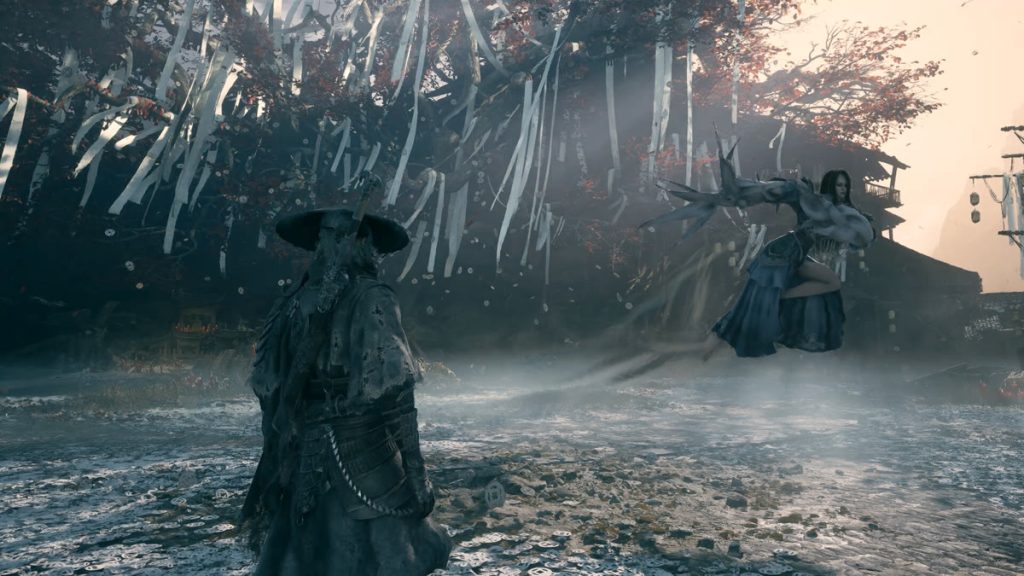
Stuck behind a web in the Mirrorwood Depths
The second problem is a softlock, meaning the game leaves you with no way forward. It happens in the Mirrorwood Depths, part of the Crimson Forest in Chapter 2. Normally, players choose between portals by listening for a weeping sound, and the path opens after two rounds, as the Game Rant solution guide explains.
Some players never reach that point. On October 31, a player on the Resonant Strings quest described a web on a tree that blocked the path completely, even though YouTube walkthroughs showed no web there. Another player reported a web near the area’s bell that stopped them from reaching the mirror puzzle.
On November 1, a third player wrote that all three portals turned into webs after the first three choices, leaving no exit after the mist scene. A Chinese-language report the same day said, in our translation, that webs remained after the mist cleared. That player had already tried reloading, uninstalling and checking the game files.
S-GAME’s workaround, and its limits
The forum moderator answered the October 31 Resonant Strings report within an hour. The advice was to “reset the illusion” in three steps:
- Wait where you are.
- Move back and forth.
- Interact with the three mirrors again.
If that fails, the moderator suggested reloading a save file. It has not worked for everyone. On November 1, the player who reported the portals turning into webs replied that they were still stuck and that reloading had not helped.
If you have not reached this area yet, the Maxroll walkthrough has advice that may save you trouble. It warns that the Mirrorwood Depths can’t be revisited after you reach the boss until the very end of the game, so it advises collecting all Memory Flowers before you touch the portals. No player in the threads linked this advice to the bug. It is simply the order the guide recommends.
The moderator’s Mirrorwood reply ended with a promise to “continue to optimize the game.” When we checked Steam at 16:10 UTC on November 1, 552,036 people were playing at once, and the game’s news feed still listed no patch.